Using Hyla
Status & Notifications
Hyla tracks what every pane is doing, so you can leave agents to work and come back when one needs you.
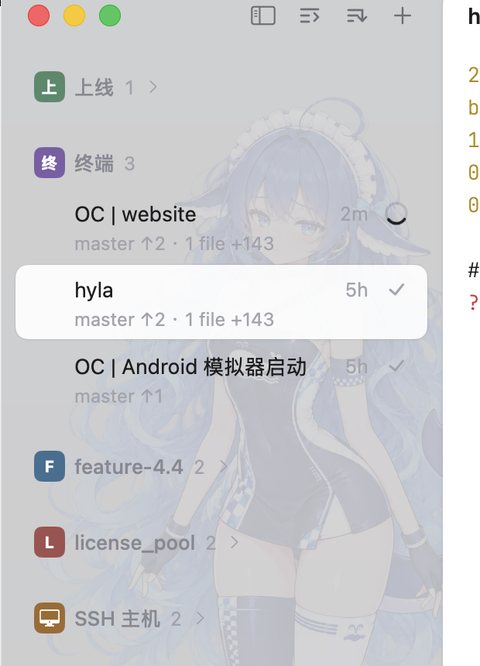
Status lives in the sidebar: working, waiting, done.
Pane status
Every pane has a status, shown in the sidebar:
| Status | Meaning |
|---|---|
working |
A program is busy: an agent thinking, a tool it runs |
waiting |
It needs you: a question, a permission prompt |
idle |
Nothing is happening; the shell is at a prompt |
error |
The program reported that it failed |
exited |
The program ended; the pane keeps its output |
Hyla tells a coding agent's status from what its screen shows: its spinner, a permission prompt, its prompt waiting for you. Redrawing the same screen, as when you resize a pane, changes nothing. Other programs are working while their title shows a spinner, or when they report their status.
A session shows the status of its panes, and sessions that need you stand out. Press ⌘ J to jump to the next one.
Notifications
Hyla notifies you when you're looking elsewhere and:
- a session comes to need you (
notify-on-waiting) - an agent finishes (
notify-on-done) - a program reports that it failed (
notify-on-error)
A program's own desktop notifications show as they would in any terminal, and leave its status alone.
The Dock icon shows how many sessions need you (dock-badge) and can bounce once when one starts to (dock-bounce). See Configuration.
Reporting status from a program
Programs and agents can tell Hyla what they're doing with hyla report:
hyla report working "Migrating the database" --progress 40
hyla report blocked "Approve the production deploy?" --kind permission
hyla report done "Deployed to staging"
hyla report clear
The states are:
| State | Meaning |
|---|---|
idle |
At rest, waiting for the next instruction |
working |
Busy; --progress gives a percentage |
blocked |
It can't go on without you; --kind says what it needs |
done |
It finished, and you haven't looked yet |
error |
It failed and stopped |
clear |
Not a state: removes what the program reported |
Hyla shows the message under the session's name in the sidebar, and in the pane's header. With sidebar-rows = compact, the sidebar shows it in the row's tooltip. A blocked report turns the session to waiting, and done or blocked notify you when you're away. --kind is permission (approve something), question (type an answer) or auth (a login or a token).
working and blocked last only as long as the program: they end when it exits. done and error stay until you type in the pane, so a program that finishes while you're away leaves its result for you to find. A program that is interrupted should report idle.
To flag a pane as needing you without changing its state:
hyla notify "Need your API key to continue"
Several tasks in one pane
A program that runs several things at once can report each of them under an --id, and name it with --title:
hyla report working "Deploying v2.4.1" --app deploy
hyla report working "Pushing image" --id us-east --title "US East" --progress 40
hyla report blocked "Approve deploy to production?" --id eu-west --title "EU West" --kind permission
hyla report clear --id us-east
Each report replaces what was there under its id, so repeat --app and --title in every one. An id can have children, as build/test is a child of build, and clear with an id removes it and its children. The pane shows the report that most needs you: blocked over working over error over done.
--app is a stable name for the program, such as cargo or terraform, which ids under it take on.
The escape sequence
hyla report writes an OSC 7501 escape sequence, the Program Status Protocol, which any program can write itself. It isn't Hyla's own: a program that adopts it reports to every terminal that reads it.
ESC ] 7501 ; state=<state> [:id=<id>] [:kind=<kind>] [:progress=<n>] [:app=<app>] [:title=<base64>] [:msg=<base64>] ESC \
Fields are separated by :, and msg and title are Base64-encoded UTF-8. For example, in a shell:
status() {
  printf '\e]7501;state=%s:msg=%s\e\\' "$1" "$(printf '%s' "$2" | base64 | tr -d '\n')"
}
status working "Syncing photos"
rsync -a ~/Photos backup:/photos && status done "Photos synced" || status error "rsync failed"
A program can ask whether the terminal reads the protocol by writing ESC ] 7501 ; ? ESC \. Hyla answers with the same sequence.
A progress bar a program shows with ConEmu's sequence, OSC 9;4, doesn't make it working: editors such as Neovim show one while their language servers load. Hyla reads it only to tell the status of coding agents that show their work that way. Programs report their status with OSC 7501.