Other machines & phones
Remote Machines
A session can run on another machine and still sit in this window's sidebar, beside the ones on this computer. Each machine runs its own hylad, so closing your laptop does not stop its work.
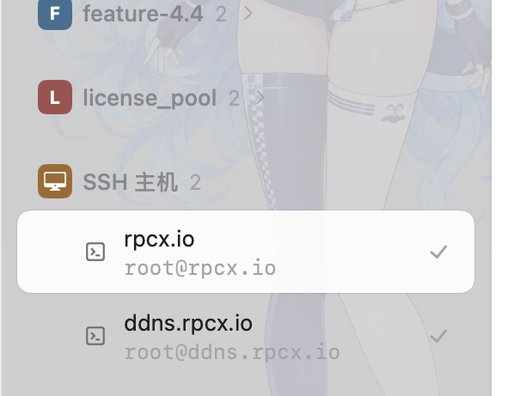
Each machine has its own group in the sidebar, with the sessions that run on it.
Add a machine
In the sidebar's + menu choose Add SSH Host… for an SSH host, a WSL distro or another Hyla, or Add K8s Pod… for a pod:
| Kind | Address |
|---|---|
| SSH | me@devbox, or ssh://me@devbox:2222 |
| WSL | wsl://Ubuntu |
| Another Hyla | tailcat:// and its pair code |
| K8s pod | the pod's namespace and name |
Hyla needs to be installed on the machine; if it is missing, or older than yours, the app offers to install or update it over the connection. The app keeps the hosts itself: there is no host key in the configuration file, and hyla p2p and hyla pocket are about other machines reaching this one, not about reaching them.
In the sidebar
Each machine's sessions are listed beside your own, marked with the host they run on and the colour you gave it. A session that needs you stands out the same way, wherever it runs. Files, panes and the CLI work as on this machine: hyla there starts a session there.
When it drops
A sleeping laptop or a lost link shows the host as disconnected rather than losing its sessions; Reconnect Host brings them back. Disconnect Host leaves them running on the machine. The host's hylad can be restarted from the app, and a host whose Hyla is older than yours says so, with the update a menu item away.
A host's programs can drive this app only when it is allowed: Settings › Remote has the switch, and the host's remote-control key is the same one.
Tailcat
Tailcat connects two machines without an account and without installing Tailscale: the listener shows a pair code, you paste it into the other machine, and the two find each other through a relay. Once they do, the data goes directly between them when the network allows it, and through the relay when it does not.
Hyla listens only when you ask it to: listen = tailcat://:7473 in the configuration file, or the listener in Settings › Remote. It is off by default.