Reference
Configuration
Hyla keeps its settings in one plain-text file. The Settings window (⌘ ,) edits it for you, keeping your comments and order, and Hyla reloads it when you edit it by hand.
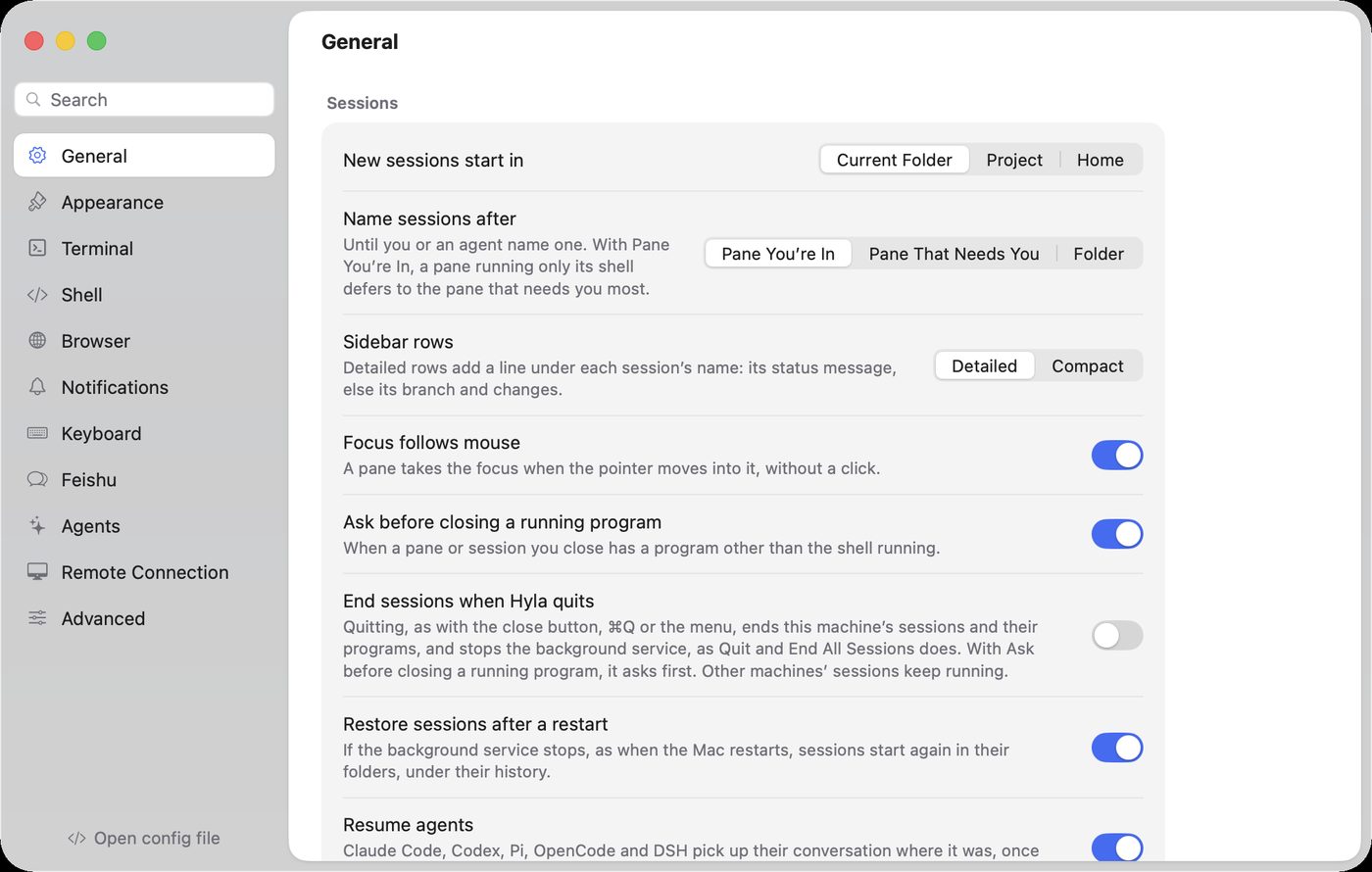
Settings edits the file for you; General holds where sessions start and whether they come back.
The file
Hyla reads, in order of preference:
$HYLA_CONFIG$XDG_CONFIG_HOME/hyla/config~/.config/hyla/config
It uses Ghostty's syntax: one key = value per line, # for comments, and repeated lines for keys that hold lists. Where a key means what it means in Ghostty, it has Ghostty's name.
# ~/.config/hyla/config
font-size = 14
theme = light:GitHub Light Default,dark:Catppuccin Mocha
cursor-style = bar

env = EDITOR=nvim
env = HOMEBREW_NO_AUTO_UPDATE=1

keybind = cmd+shift+d=pane.split.down
The file only needs what you change. Everything else keeps its default.
hyla config edit              # open it in $EDITOR
hyla config show              # every key with its current value
hyla config check             # report unknown keys and bad values
General
| Key | Default | Description |
|---|---|---|
new-session-directory |
current |
Where a new session starts: current, project or home |
session-name |
focused |
What names a session you haven't: focused, lead or folder (more) |
sidebar-rows |
detailed |
How the sidebar shows a session: detailed, with its status message, else its branch and changes, on a second line; or compact, on one line |
focus-follows-mouse |
false |
Focus the pane the pointer moves into |
confirm-close |
true |
Ask before closing a pane that a program is running in |
restore-sessions |
true |
Start sessions again after hylad restarts, as after a reboot |
resume-agents |
true |
As sessions start again, resume the conversation of the agent each pane ran |
quit-ends-sessions |
false |
Quitting, as with the close button, ⌘Q or the menu, ends this machine's sessions and their programs, and stops hylad, as Quit and End All Sessions does; it asks first, as confirm-close says, while a program runs. Other machines' sessions keep running (more) |
session-history |
false |
List the agents' ended conversations in the sidebar, to resume or archive (more) |
macos-show-app-icon |
dock-and-menubar |
Where Hyla's icon shows on macOS: dock-and-menubar, dock or menubar. While it's in the menu bar, closing the window keeps Hyla running there. Windows and Linux always show it in the notification area, where closing the window does the same |
Appearance
| Key | Default | Description |
|---|---|---|
window-theme |
system |
The app's appearance: system, light or dark |
language |
system |
The app's language: system, en, ja or zh-Hans |
background |
petal |
The window's wash: petal, mist, meadow, plain or dock (the Dock's: Liquid Glass under a thin veil) |
window-translucent |
true |
Let the desktop show through the window |
window-opacity |
0.82 |
How much of the window's background the wash covers while translucent, 0 to 1 |
window-blur |
true |
Blur the desktop behind the translucent background; off is plain transparency |
window-material |
sidebar |
The window's material behind the wash while blurred: sidebar, window, popover, plastic (a frosted content background), glass (Liquid Glass, as the Dock's) or glass-clear |
sidebar-image |
A picture behind the sidebar's sessions: as tall as 80% of the sidebar, centred vertically and against its left edge; empty for none | |
sidebar-image-opacity |
0.35 |
How much of the sidebar's picture shows, 0 (none) to 1 (whole) |
pane-image |
A picture in the terminals' cards, under their text, in place of the window's background: as wide as the card, from its top; empty for none | |
pane-image-opacity |
0.6 |
How much of the terminals' picture shows, 0 (none) to 1 (whole) |
pane-image-fit |
fill |
How the terminals' picture fills a card, as a macOS desktop picture's options: fill, as wide as the card from its top; fit, all of it; stretch, to the card's edges; center, its own size at the middle; or tile |
session-switch |
dissolve |
How a session shown in place of another comes in, as a slide transition: dissolve fades it in as the one it leaves fades away; slide brings it in from the right; push and cover slide it in from the right; zoom grows it into place; or none shows it at once |
pane-opacity |
0.82 |
How much of the window's background shows in a terminal while the window is translucent, 0 to 1, as window-opacity: 0 shows the desktop alone; the text stays opaque |
pane-blur |
false |
Blur what shows through the terminals; off is plain transparency |
pane-material |
glass |
The terminal's glass while pane-blur is on: glass (Liquid Glass), plastic (a frosted content background) or glass-clear |
pet |
true |
Hyla, the tree frog, who follows your sessions from the window's top edge |
pet-offset |
0.5 |
Where Hyla stands, 0 to 1 across the window; drag it there |
pet-set |
hyla |
The pet on the window's edge: hyla the tree frog, codex for the Codex app's active pet, or a pet's directory name in ~/.codex/pets |
pet-size |
1.5 |
How tall a Codex pet shows, against the Codex app's size: 0.5 to 3 |
Terminal
| Key | Default | Description |
|---|---|---|
theme |
hyla |
Terminal colors: hyla, any Ghostty theme, or light:<theme>,dark:<theme> |
font-family |
Empty for JetBrains Mono Nerd Font, which Hyla includes; monospace for the system's; or any installed family |
|
font-fallback |
Fonts for what font-family lacks, such as Chinese, in the order they are tried: PingFang SC, Apple Color Emoji. Empty for the system's choice |
|
font-size |
13 |
In points |
font-weight |
400 |
100 to 900; Hyla’s font draws 200 (extra light) and 300 (light) itself |
line-height |
1.22 |
A multiple of the font's |
font-ligatures |
true |
Join characters the way the font draws them |
font-thicken |
false |
A heavier stroke, as in Ghostty |
minimum-contrast |
3 |
The least contrast text keeps with its background, from 1 (none) to 21, so that colors meant for a dark background stay readable on a light one, as in Ghostty |
dim-unfocused-terminals |
true |
Fade the terminals you're not in, when a session has several panes |
cursor-style |
block |
block, bar or underline; programs may change it |
cursor-style-blink |
true |
Blink the cursor |
macos-option-as-alt |
false |
Option sends Alt (Meta) to programs |
copy-on-select |
false |
Copy what you select to the clipboard |
clipboard-read |
ask |
Programs reading the clipboard (OSC 52): ask, allow or deny |
right-click-action |
context-menu |
context-menu, paste or copy-or-paste |
mouse-scroll-multiplier |
precision:1,discrete:3 |
How far scrolling goes, as in Ghostty: precision: scales a touchpad's, discrete: is the rows a notch of a mouse wheel scrolls (on Windows, a notch at its 3-line setting); one number sets both, from 0.01 to 10000 |
Shell
| Key | Default | Description |
|---|---|---|
command |
The shell of new panes; empty for your login shell | |
env |
Added to every pane's environment as NAME=value; repeat it |
|
scrollback-limit |
4 |
The output each pane keeps, in megabytes; 0 for none |
Notifications
| Key | Default | Description |
|---|---|---|
notify-on-waiting |
true |
When a session needs you |
notify-on-done |
true |
When an agent finishes |
notify-on-error |
true |
When a program reports it failed |
notify-sound |
false |
Play a sound with notifications |
dock-badge |
true |
Show how many sessions need you on the Dock icon |
dock-bounce |
false |
Bounce the Dock icon once when a session comes to need you |
Agents
| Key | Default | Description |
|---|---|---|
remote-control |
true |
Let hyla do and hyla focus drive the app |
Hosts
| Key | Default | Description |
|---|---|---|
listen |
Let Hyla on other machines reach this one: tailcat://:7473, through a relay with a pair code. Repeat it for each |
Git
| Key | Default | Description |
|---|---|---|
git-status |
true |
Show each session's branch and changes |
diff-layout |
auto |
Diffs in the changes panel: unified, split (side by side), or auto, side by side once it's wide |
worktree-base |
default |
What a session's own worktree branches from: default, the repository's default branch, or current, the branch of the session you're in |
worktree-dir |
Where sessions' own worktrees go, each under its repository's name; empty for .hyla/worktrees in the repository |
Browser
| Key | Default | Description |
|---|---|---|
browser-block-ads |
true |
Block ads and trackers in browser panes |
browser-filter-list |
easylist, easyprivacy |
A filter list to block with. Repeat it for each list; leave it empty for none |
browser-filter-list takes the lists Hyla offers by name, or the https:// URL of any list in Adblock Plus syntax:
| Name | List |
|---|---|
easylist |
EasyList: ads |
easyprivacy |
EasyPrivacy: trackers and analytics |
peter-lowe |
Peter Lowe's list: ad and tracker servers |
easylist-china |
EasyList China: ads on Chinese sites |
fanboy-cookie |
EasyList Cookie List: cookie notices and consent banners |
fanboy-social |
Fanboy's Social Blocking List: social media buttons and embeds |
fanboy-annoyance |
Fanboy's Annoyance List: pop-ups and prompts, with the two above |
browser-filter-list = easylist
browser-filter-list = easyprivacy
browser-filter-list = fanboy-cookie
browser-filter-list = https://example.com/my-filters.txt
Keyboard
keybind rebinds an action, as <keys>=<action>. Repeat it for each binding. Use unbind as the action to free keys.
keybind = cmd+shift+d=pane.split.down
keybind = cmd+k=palette.open
keybind = cmd+b=unbind
Run hyla actions for every action id, and see Keyboard Shortcuts for the defaults.